


A practical step-by-step guide to identifying processes that are ready for robotic process automation
RPA can help businesses reduce repetitive manual work, improve accuracy and give employees more time to focus on higher-value activities. But successful automation does not begin with choosing an RPA platform. It begins with understanding whether the process itself is suitable for automation.
This matters as businesses move from experimenting with automation to making it part of everyday operations. A Bain & Company and UiPath survey found that 64% of organisations had deployed RPA, while 85% said increasing efficiency and productivity was a primary motivation for adopting automation technologies.
For Enterprises and Growth companies, the challenge is therefore not simply finding something to automate. It is finding the right process to automate first.
An RPA readiness audit gives you a structured way to do that. Before investing in development, you can assess your processes, systems, data, risks and potential return to determine where automation is most likely to deliver measurable value.
Jump to
- Step 1: Identify Your Most Repetitive Processes
- Step 2: Map the Process From Start to Finish
- Step 3: Score the Process for RPA Suitability
- Step 4: Check Your Systems and Data
- Step 5: Assess Risk, Security and Human Oversight
- Step 6: Calculate the Business Case
- Common RPA Readiness Mistakes
- What Happens After the Audit?
- How Fliweel Helps
- RPA Readiness FAQ
Step 1: Identify Your Most Repetitive Processes
Start with the work your teams perform repeatedly.
Do not begin by asking, “Where can we use RPA?” Instead, ask, “Where are people spending significant amounts of time doing repetitive work?”
Look for activities such as:
- Copying information between systems
- Processing invoices or purchase orders
- Updating spreadsheets
- Moving data between applications
- Generating routine reports
- Checking records against predefined rules
- Sending standard notifications
- Creating or updating customer records
- Processing repetitive administrative requests
The goal is to build a list of candidate processes before deciding which ones should be automated.
Audit question:
Which processes consume the most repetitive employee time each week?
Step 2: Map the Process From Start to Finish
Once you have identified candidate processes, document exactly how each one works.
This is where many automation projects uncover an important problem: the documented process is often different from the process employees actually follow.
Speak to the people who perform the work every day. Ask them what happens when information is missing, a system fails, a customer responds differently or an exception occurs.
Document:
- What triggers the process
- Who performs each step
- Which systems are involved
- What information is required
- Where decisions are made
- What happens when information is missing
- What exceptions occur
- What happens when something goes wrong
- What the final output should be
Process mining and task mining can also help businesses understand how processes actually operate. Microsoft describes Power Automate’s process mining capabilities as a way to identify inefficiencies, understand processes using real data and discover potential automation opportunities.
Audit question:
Could someone unfamiliar with the process understand every step simply by reading your process map?
Step 3: Score the Process for RPA Suitability
Not every repetitive process is a good RPA candidate.
A strong candidate typically has clearly defined rules, structured inputs and predictable outputs. It should also occur frequently enough for the automation effort to produce a meaningful return.
Score each candidate against the criteria below. The more closely a process matches the “Strong Candidate” column, the more likely it is to be a practical RPA opportunity.
| RPA Readiness Factor | Strong Candidate | Weak Candidate |
|---|---|---|
| Repetition | High-frequency task performed regularly | Infrequent or occasional task |
| Rules | Clear and consistent rules determine each action | Frequent human judgement or interpretation is required |
| Data | Structured, consistent and accessible data | Unstructured, incomplete or unreliable data |
| Process Stability | Stable process with documented steps | Process changes frequently or lacks clear documentation |
| Exceptions | Few exceptions that can be clearly defined | Many exceptions requiring human intervention |
| Systems | Stable applications with reliable access | Frequently changing systems or difficult interfaces |
| Volume | High transaction or task volume | Low volume with limited repetition |
| Business Value | Meaningful potential for time, cost or efficiency gains | Limited impact or minimal measurable benefit |
A process does not need to score perfectly across every category. The objective is to identify where RPA can deliver practical value with manageable complexity.
For example, a weekly reporting workflow that pulls information from several systems, combines it into a standard report and distributes it to managers may be a strong candidate.
A customer complaint process requiring employees to interpret individual circumstances and make complex decisions is likely to require a different approach.
Audit question:
Is the process predictable enough for software to follow most of the time?
Step 4: Check Your Systems and Data
A process can look ideal for automation but still present technical challenges.
Review every application involved in the workflow. Determine how the automation would interact with each system and whether the required information is consistently available.
Check for:
- Missing information
- Duplicate records
- Inconsistent formats
- Manual data corrections
- Unstructured documents
- Different naming conventions
- Access restrictions
- Legacy applications
- Unstable interfaces
- Systems that frequently change
You should also determine whether an API, existing connector or user-interface automation is the most appropriate way to connect the systems.
Modern automation platforms can combine different approaches. Microsoft Power Automate, for example, supports cloud-based automation through connectors as well as desktop flows for UI-based RPA.
Audit question:
Will the automation have reliable access to the systems and information it needs?
Step 5: Assess Risk, Security and Human Oversight
RPA readiness is not only a technical question.
You also need to understand what the automation will be allowed to access and what could happen if it makes an incorrect decision.
Review:
- Personal and confidential information
- Financial transactions
- Customer records
- Regulatory requirements
- Approval responsibilities
- System permissions
- Audit trails
- Error handling
- Human approval points
Some processes should not be fully automated.
Instead, you may automate the preparation and routing of information while keeping a human responsible for the final decision.
Audit question:
Where must a person remain responsible for reviewing, approving or overriding an automated action?
Step 6: Calculate the Business Case
Once you understand the process, calculate whether automating it makes commercial sense.
Start by estimating the current manual effort.
A simple starting point is:
Annual manual effort = transactions per year × average processing time
Then consider:
- Employee time saved
- Error reduction
- Faster processing
- Increased operational capacity
- Reduced administrative workload
- Customer experience
- Compliance benefits
- Implementation costs
- Maintenance costs
Do not measure the opportunity purely by hours saved.
An automation that saves a small amount of time but eliminates a significant operational bottleneck could be more valuable than an automation that saves hundreds of hours but has little strategic impact.
Audit question:
Can you clearly explain what business outcome the automation will improve?
Common RPA Readiness Mistakes
1. Automating a broken process
If a workflow contains unnecessary approvals, duplicate data entry or avoidable manual steps, improve the process before automating it.
Automating inefficiency does not remove inefficiency.
2. Choosing the technology before choosing the process
Starting with “We need an RPA platform” can result in a technology-led project without a clearly defined business problem.
Start with the process, the problem and the desired outcome.
3. Ignoring exceptions
A process that works perfectly in most cases may still require careful handling of exceptions.
Map those exceptions before development begins and decide which should be automated, escalated or handled manually.
4. Focusing only on technical feasibility
A process may technically be automatable but still be a poor business investment.
Always consider value, risk, process stability and maintenance requirements alongside technical feasibility.
What Happens After the Audit?
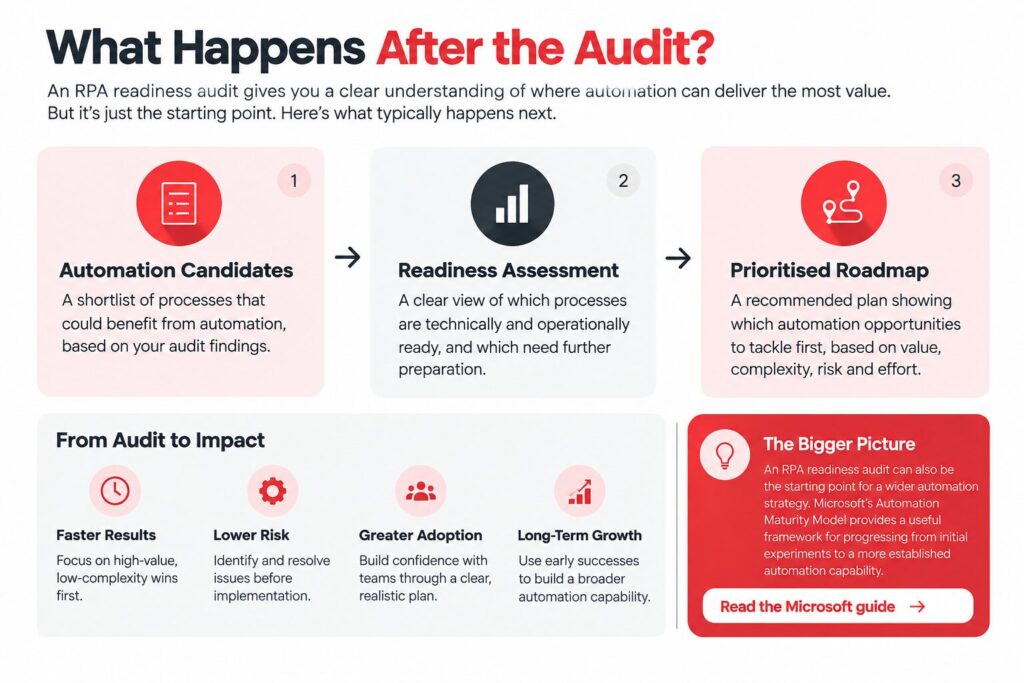
A useful RPA readiness audit should leave you with three practical outputs.
1. A list of automation candidates
You should have identified the repetitive workflows where automation could potentially create value.
2. A readiness assessment
You should understand which processes are technically, operationally and organisationally ready.
3. A prioritised automation roadmap
Your candidates should then be ranked according to potential value, complexity, risk and implementation effort.
The best first automation is not necessarily the biggest or most impressive one.
It is often the process where the business can demonstrate measurable value while keeping implementation manageable.
This also creates a foundation for broader intelligent automation. RPA can handle structured, rule-based work, while AI and integrations can support processes involving documents, language, classification and more complex workflows.
Research from UiPath’s 2024 Global Knowledge Worker Survey found that workers using both GenAI and business automation reported greater perceived value and time savings than those using either technology alone.
That makes the readiness audit useful beyond traditional RPA. It can become the first step towards deciding where different forms of automation and AI can work together.
How Fliweel Helps
Fliweel helps businesses identify and implement practical AI and automation opportunities across their existing technology environment.
The starting point is understanding the business process and the outcome the organisation wants to achieve. From there, the appropriate combination of automation, AI and integrations can be considered rather than forcing every problem into the same technology.
Fliweel works with automation technologies including Microsoft Power Automate and Zapier, alongside AI strategy, implementation and systems integration.
For businesses looking for a structured way to move from an identified opportunity towards a working solution, Fliweel’s 6-Week AI Sprint provides a focused path from discovery through design, building, testing, iteration and deployment.
The objective is not to automate for the sake of automation.
It is to identify where technology can create measurable business value and turn that opportunity into a solution the organisation can actually use.
Ready to find out whether your business is ready for RPA?
Start by auditing your highest-impact repetitive processes. Identify where the workflow is stable, the rules are clear, the data is reliable and the potential business value is measurable.
Then prioritise the opportunities worth taking forward.
RPA Readiness FAQ
What makes a process suitable for RPA?
The strongest candidates are generally repetitive, rule-based and high-volume processes with structured inputs, predictable outputs and relatively few exceptions.
Should we automate a process that changes frequently?
Frequent changes can make traditional RPA harder to maintain. Consider whether the workflow can first be standardised or whether another automation approach would be more suitable.
Do we need to replace our existing software before implementing RPA?
Not necessarily. RPA can often work with existing applications as long as the automation can reliably access the required systems and information.
Is RPA still relevant as businesses adopt AI?
Yes. RPA is useful for structured, rule-based tasks, while AI can support documents, language, classification and more complex workflows. The two can also work together as part of an intelligent automation strategy.
Final Takeaway
An RPA readiness audit helps your business distinguish between processes that are genuinely ready for automation and those that need improvement first.
Start with the work, not the technology. Map the process, assess its suitability, check your systems and data, understand the risks and calculate the potential business value.
Then automate where the business case is clear.
ABOUT FLIWEEL.TECH
Fliweel.tech is a leading provider of AI and automation solutions, specialising in intelligent bot development and robotic process automation. Our mission is to help businesses streamline their operations, reduce errors, and focus on higher-value tasks through innovative technology. With a commitment to excellence and customer satisfaction, Fliweel.tech delivers customised solutions that drive tangible results for clients across various industries.